Audio Pitch Changer Online
Change audio pitch online with AudioMuse. Upload a song, MP3 file, voice recording, or video audio, raise or lower the pitch, change song key for practice, and export the adjusted audio in your browser.
Change Pitch Now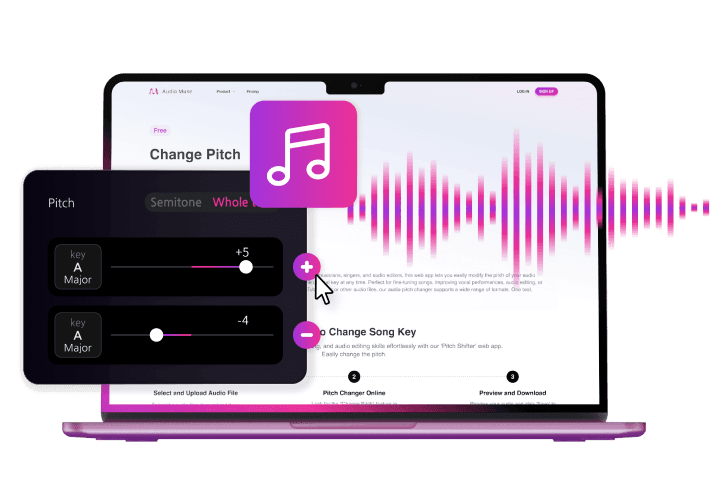
Audio Pitch Changer Online,Free
AudioMuse Audio Pitch Changer helps you raise or lower audio pitch online without installing software. Upload MP3, MP4, WAV, FLAC, OGG, OPUS, AAC, or M4A files, change pitch for songs, voice recordings, music clips, or video audio, preview the result, and export the adjusted audio as MP3, WAV, FLAC, OGG, or OPUS.
Change Audio Pitch Online
Raise or lower the pitch of songs, voice recordings, music clips, and audio files directly in your browser. Change how high or low the audio sounds while keeping the workflow simple.
Change Audio Pitch
Change Song Key for Singing and Practice
Transpose a song to better fit your vocal range or instrument. Lower the pitch if high notes feel strained, raise the pitch if low notes feel weak, and export a practice version that is easier to use.
Change Song Key
Change MP3 Pitch Online
Upload an MP3 file and adjust its pitch for practice, covers, remixes, ringtone ideas, samples, or quick music edits. Export the adjusted audio when the pitch fits your project.
Change MP3 Pitch
Change Pitch from Video Audio
Upload an MP4 video, work with its audio, and change the pitch of music, voice, narration, or sound from the video. Export the adjusted sound as an audio file for editing or creative use.
Change Video Pitch
Use Pitch Shifting for Music, Voice, and Creative Edits
Use pitch shifting to test remix ideas, adjust vocals, prepare mashups, create character-style voice effects, or make audio fit a different musical key.
Shift Pitch
Who Is Audio Pitch Changer For?





Why Choose AudioMuse’s Audio Pitch Changer Online?

Easy Pitch Control
Upload your file, raise or lower pitch, preview the result, and export the adjusted audio with a simple browser-based workflow.

Works for Songs, MP3, Voice, and Video Audio
Change pitch for music practice, covers, MP3 files, voice clips, video audio, remixes, and creative projects.

Change Pitch in Your Browser
Use AudioMuse Audio Pitch Changer online without installing desktop audio editing software.

Flexible Upload and Export Formats
Upload MP3, MP4, WAV, FLAC, OGG, OPUS, AAC, or M4A files and export the final result as MP3, WAV, FLAC, OGG, or OPUS.
How to Change Audio Pitch Online
Upload your audio or video file, raise or lower pitch, preview the result, and export the adjusted audio from your browser.
Upload Your Audio or Video File
Upload an MP3, MP4, WAV, FLAC, OGG, OPUS, AAC, or M4A file. If your sound is inside a video, you can work with the video audio and export the adjusted result as an audio file.
Raise or Lower the Pitch
Shift the pitch up or down to change how high or low the audio sounds. Use it for songs, MP3 files, voice clips, video audio, music practice, covers, or creative edits.
Preview and Export
Listen to the pitch-adjusted audio, make changes if needed, trim or fade the clip if useful, and export the finished audio in your preferred format.
What they say about AudioMuse’s Audio Pitch Changer Online ?
Other online audio tools:
More From Audio Pitch Changer

Everything you Need, All in one Place
Choose Audio Muse for all your online audio or music processing needs with a full suite of tools in one easy-to-use platform. Edit audio directly from your browser, remove noise, convert file formats, and perfect your tracks - all without downloading extra software. Plus, manage your projects from any device, anytime. Your go-to for audio solutions.