
True peak estimates the highest level of the reconstructed audio waveform, including peaks between stored samples. It is expressed in dBTP. It helps you spot a different problem from overall loudness: a song may sound comfortably loud but still have very little peak headroom.
If your master becomes harsh after export, or a meter shows peaks above full scale even though the original samples look safe, check true peak before pushing the song louder. Use the reading alongside listening, not as a replacement for it.
What Does True Peak Actually Measure?
A digital recording stores individual samples. The waveform those samples represent can reach its maximum between the stored points, so its reconstructed peak can be higher than the largest sample. A true-peak meter estimates that maximum using interpolation and oversampling, as described in ITU-R BS.1770.
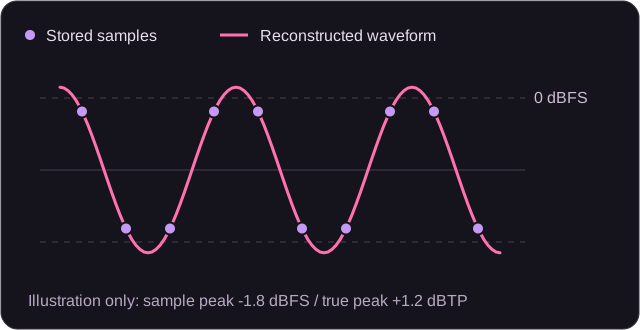
The TP in dBTP means true peak; the reference is digital full scale. A negative reading leaves margin below that reference. A positive reading indicates an estimated peak above it, not proof that audible distortion is present in every playback chain.
True Peak, Sample Peak and LUFS Answer Different Questions
| Reading | What it tells you | What it does not tell you |
|---|---|---|
| Sample peak · dBFS | The highest stored sample level | Whether a reconstructed peak exceeds that level |
| True peak · dBTP | The estimated maximum including inter-sample peaks | How loud the complete song feels |
| Integrated loudness · LUFS | The measured overall loudness of the programme | Whether its maximum peak meets the delivery ceiling |
Do not use one number as a substitute for the others. If your song feels quiet, investigate its loudness and arrangement. If its highest reconstructed peaks leave too little margin, investigate peak control. A preset or volume boost does not remove the need to check the result.
How Much True-Peak Headroom Should You Leave?
Start with the delivery requirements for your distributor, broadcaster or client. There is no single true-peak target that covers every format and destination.
For example, Spotify's mastering guidance recommends a maximum below -1 dBTP and a lower maximum below -2 dBTP for masters louder than -14 integrated LUFS. Those are Spotify's guidelines, not a universal mastering rule or an AudioMuse output guarantee.
EBU R 128 uses a different programme context and loudness specification. Its production guidance also considers maximum true peak. Read the complete specification rather than borrowing one ceiling from a different delivery workflow.
The practical decision is not simply "louder or quieter." You want a version with the energy you intended, enough margin for the destination, and no distracting damage. Compare alternatives at a similar listening level before choosing one.
Why Can Peaks Change After Export or Encoding?
Limiting, gain changes, resampling and lossy encoding can affect the peak behaviour of a file. The file you deliver may therefore need a fresh measurement even if the earlier session looked acceptable.
A true-peak limiter is a processing tool, while a true-peak meter is a measurement tool. Enabling a limiter does not replace checking the final export. iZotope's true-peak limiter explanation describes how oversampled peak detection guides limiting.
Listen especially to sharp percussion, vocal consonants and dense choruses. Roughness can have several causes, so do not diagnose clipping from sound alone. Compare the original mix, the mastered file and the actual delivery encode where you can.
Check True Peak Before You Master Your Song
- Keep an untouched mix. Save the version before any new mastering or loudness changes so you can return to it.
- Measure the complete file. Open Loudness Meter, switch to File, and analyze the recording. Review True peak in dBTP alongside Sample peak and Integrated LUFS.
- Find the decision that needs attention. Is the whole song quieter than intended, are isolated peaks too high, or is the mix already distorted? Those are different jobs.
- Correct the source where needed. For a problematic clip, arrangement or balance, return to Audio Editor or your mixing session instead of repeatedly mastering the same damaged export.
- Compare and keep notes. Record the readings, the file format and what you hear. Use the same measurement method for the original and the result.
AudioMuse's file analysis displays an estimated true peak. Use a validated meter and the required specification when formal delivery compliance matters. A reference target shown on a meter is not a setting that changes the file.
Your Mix Is Ready? Bring It into AI Mastering
AI Mastering works on one completed music mix, with vocals and instruments already combined. Upload your finished recording below, review the available mastering settings in the app, and compare the preview with your original.
Mastering can change the overall sound and loudness. It is not a promise to hit a specific dBTP ceiling, repair every clipped source, or pass a platform specification without measurement. Recheck the downloaded result before release.
Your file opens in AI Mastering with the mix ready to review. Choosing a file does not start processing or use credits.
A True-Peak Checklist for Your Finished Master
- Source: The input mix is the intended version and does not contain obvious clipping.
- Measurement: You analyzed the complete downloaded master, not only a short preview.
- Destination: The measured true peak and loudness meet the actual delivery requirements.
- Sound: Vocals remain clear, percussion keeps its impact, and loud sections do not become harsh.
- Format: Any converted delivery copy has also been checked.
- Comparison: You prefer the result for its sound, not only because it plays louder.
True Peak in Music Mastering: FAQs
What is a good true peak for music mastering?
Use the ceiling required by the destination. A value such as -1 dBTP needs context: different delivery workflows and louder masters may need more margin. Check the current guidance and measure the actual exported file.
Why is true peak higher than sample peak?
The reconstructed waveform can reach its highest point between the stored samples. A sample-peak reading checks those samples; a true-peak estimate also accounts for the waveform between them.
Is 0 dBTP the same as 0 LUFS?
No. dBTP describes estimated peak level relative to full scale. LUFS describes measured loudness over time. The values answer different questions and cannot be substituted for one another.
Does a positive true peak mean I will hear clipping?
Not necessarily on every device or playback chain. It signals an estimated peak above full scale and possible headroom concerns. Investigate the reading, the destination and the sound rather than assuming either guaranteed distortion or guaranteed safety.
Can lowering the volume repair existing clipping?
Lowering gain creates level margin, but it does not restore peaks already damaged in the source. A cleaner source export is preferable to hiding the damage under a quieter playback level.
Does AI mastering automatically guarantee a true-peak ceiling?
Do not assume it does. A style or loudness choice is not proof of a particular dBTP result. Measure the full downloaded master and check its delivery requirements.
Do I need to check an MP3 or AAC after conversion?
Yes, check the copy you actually intend to distribute. An earlier lossless export and a later delivery encode are separate files and may produce different readings or audible results.
Should I use a live meter or file analysis for my master?
Use file analysis for the complete rendered recording. Live monitoring helps during playback or production, but a live capture may cover only part of the song or a different signal path.
Sources and Editorial Notes
- ITU-R BS.1770-5: loudness and true-peak measurement.
- EBU R 128: programme loudness and maximum-level guidance.
- Spotify for Artists: Loudness normalization: destination-specific mastering tips.
- iZotope: What Is a True Peak Limiter?: peak detection and processing.
Written by AudioMuse Team. Updated October 12, 2026. The workflow recommendations distinguish measurement from processing; the diagram is illustrative and is not a result from the mastering service. Delivery guidance can change, so check the destination before release.